

Available on the Enterprise plan.
Domains
To add a domain, open Settings → Security and, in the SAML SSO section, click Add domain. Then verify it by adding a TXT record in your domain provider’s interface. See Domains and login methods for how domains affect sign-in and joining.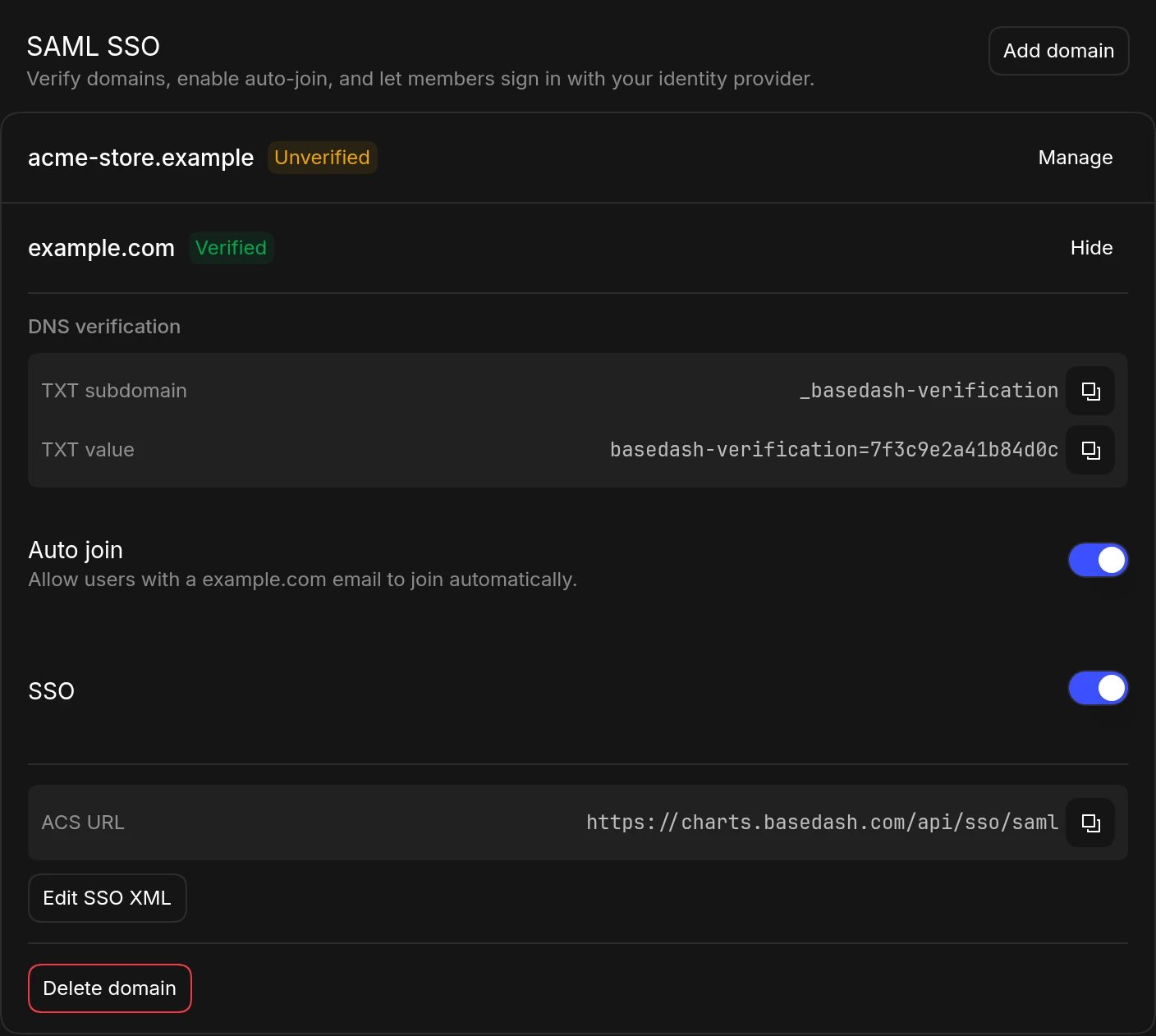
TXT record verification
We provide both a TXT subdomain and a TXT value that you must add to your domain provider’s interface. Then, you can click the option in Basedash to check the domain’s verification status. Once your domain passes the verification check, you will be able to enable domain-related features such as auto-join and SSO.Auto join
Once your domain is verified, you can enable auto-join. This allows any user who signs up or logs in with an email at your verified domain to automatically have access to your organization.SSO
Once your domain is verified, you can enable SSO. Basedash supports SSO with SAML 2.0 and OIDC. For SAML setups, add your SSO provider’s XML metadata, which we use to configure the connection with your SSO provider. We provide an ACS URL that you will need to enter on your SSO provider’s side to complete the setup. If you encounter any difficulties, please contact us for more details. Once SSO is properly configured, users will only be able to log in and sign up with emails at your verified domain using your SSO provider’s login flow.Supported SSO providers
Basedash supports major identity providers that use SAML 2.0 or OIDC. This includes:- Okta
- OneLogin
- JumpCloud
- Rippling
- Ping Identity
- Auth0
- Microsoft Entra ID (formerly Azure AD)
- Google Workspace
SCIM provisioning
Organizations can use SCIM to provision users, groups, and group memberships from a compatible identity provider. See the SCIM provisioning guide for supported operations and setup instructions.FAQ
Can people at our domain still sign in with Google or an email code?
Can people at our domain still sign in with Google or an email code?
No. Once SSO is on for a domain, everyone with an email at that domain is
sent to your identity provider, including admins. Make sure at least one
admin can sign in through your identity provider before you turn it on.
Are accounts created automatically on first SSO sign-in?
Are accounts created automatically on first SSO sign-in?
Yes, Basedash creates the account. If Auto join is on for the domain,
the person joins your organization as a Member. If it’s off, invite them
first, or they’ll end up outside your organization.
Can contractors with other email domains still sign in?
Can contractors with other email domains still sign in?
Yes. SSO only applies to emails at the domains where it’s turned on. Others
sign in with an email code or Google, unless your organization requires
Google sign-in. See Domains and login
methods.
Can we use SSO for more than one domain?
Can we use SSO for more than one domain?
Yes. Add each domain in Settings → Security. Each one has its own SSO
setting and identity provider metadata, so different domains can use
different identity providers.